Buying a laptop is a commitment! Once you buy it, you can’t decide to change or upgrade any part of the system, as doing so is impractical in terms of cost and time. So plan before buying a laptop, and make sure it’s a fully loaded model that is up to date.
One of the important features of a laptop is its memory. While most laptops come with a 128 MB memory, it’s wise to invest in more memory such as a system memory (RAM) of 256 MB or even better, 512 MB, for the easier ru...
Buying a laptop is a commitment! Once you buy it, you can’t decide to change or upgrade any part of the system, as doing so is impractical in terms of cost and time. So plan before buying a laptop, and make sure it’s a fully loaded model that is up to date.
One of the important features of a laptop is its memory. While most laptops come with a 128 MB memory, it’s wise to invest in more memory such as a system memory (RAM) of 256 MB or even better, 512 MB, for the easier running of programs under Windows ME, Windows XP, and others. After all, the more memory the merrier!
Another main feature of a laptop is its port. A port is a slot through which external material such as microphones and cameras are connected. Laptops come with a serial port, infrared, parallel, and a Universal Serial Bus (USB) ports. Most external equipment correspond with different ports, which is why there are several types of ports in a laptop. However, it is best to opt for at least two USBs, as this is fast becoming the most popular of ports.
CD-ROM drives are not a standard feature of laptops, but it is best to have one installed, as most software comes in CDs these days. Even better would be to install a DVD-ROM drive, which can be used to read CD-ROMs too. A DVD-RW drive is capable of writing and rewriting CDs and DVDs. Also, when on a lengthy trip, having a DVD drive means you can check out your favourite DVD!
Laptops come with internal modems or external PC card-based modems for ready Internet access. The majority of new laptops even come with modules for wireless networking, like Apple’s laptops which are Wi-Fi compatible.
Input devices in a laptop range from the Touchpad to the Pointing Stick. A Touchpad is located beneath the spacebar on the laptop keyboard. It is touch sensitive; use your fingers on the Touchpad to move the cursor across the screen. The Pointing Stick is a rubber nub set in the laptop keyboard, and can be used to navigate the cursor by applying pressure with your index finger, similar to using a joystick. You can also plug in a standard mouse should you feel the need to do so.
There are a staggering number of laptop brands in the market today, so choosing that perfect laptop suited to your needs is no problem at all!
The Toshiba Portege R100 is a laptop specially designed for the mobile professional. With a striking appearance, bright screen, and integrated webcam, the Sony TR3A Vaio Ultraportable Laptop is the perfect travel partner. The Sony Vaio X505 is super thin, and uses carbon-fiber for its chassis, making it shock-free and robust. The Panasonic Toughbook Y2 Ultraportable incorporates a number of computer features in a portable and durable design, and pays special attention to battery life. For an excellent Multimedia feature set and attractive design, the Dell Inspiron 700M Notebook fits the bill.
Take your pick!
Tampilkan postingan dengan label Technology. Tampilkan semua postingan
Tampilkan postingan dengan label Technology. Tampilkan semua postingan
Selasa, 26 Juli 2011

Selasa, 05 April 2011
An inside look at the testing of Windows Phone
REDMOND, Wash.--On a rather sunny August day deep within one of the many nondescript buildings that dot Microsoft's campus, a robot taps away at a prototype Windows Phone 7 to double-check that the screen is accurately reading touch input. Another robot, affectionately dubbed Wally, tests the accelerometer and other sensors built into the new phones. A building over, thousands of phones are going through a variety of stress tests, including both automated and hand-performed tasks.
That's a major shift for Microsoft, which in the past focused on making sure its software was bug-free and left much of the testing of final phones to the partners that make the actual Windows Phone devices.
"We really felt like our product quality ensuring system infrastructure wasn't good enough," said Darren Laybourn, general manager of test for Microsoft's phone unit. Laybourn and his team allowed CNET an exclusive view inside the testing labs as the company was putting the final touches on its software and helping its phone maker partners gain approval from various cell phone carriers. "We spent over $15 million on hardware...we've added hundreds of senior people to the team, we've completely revamped our processes."
Microsoft used its beefed-up testing methods as part of its effort to convince carriers that it was serious about getting back in the phone game.
"That was kind of my story," Laybourn said, showing a slide deck he used in pitches to AT&T and other cell service providers. "Here's why we suck less, basically."
Indeed, Windows Phone 7, which went on sale in the U.S. on Monday, is arguably one of the most heavily tested products to come out of Microsoft, save perhaps a full release of Windows or Office.
With Windows Phone 7, Microsoft felt it needed to do more of the testing work in-house, both to help speed the process of getting phones approved on various cellular networks and to ensure consistent quality. As part of that effort, Microsoft employed more than 4,500 actual phones and tens of thousands of virtual devices running on servers. That's up from about 60 phones that Microsoft used to test the prior generation of phones.
In all, Microsoft ran through more than 10 million hours of automated testing, or about 20,000 phone-hours per day. Microsoft is of course, not alone in doing this kind of testing. Phone makers and carriers do this all the time. Even its software rival, Google, has been known to go through a similar approach, as the company did with the Nexus One--a process they documented in a video posted to YouTube.
Just in time?
With Windows Phone 7 though, Microsoft was in something of a hurry. After suffering through many delays and a complete "reset" of the project, the company had bet its reputation on delivering an operating system that would be on phones and on sale in time for this year's holiday season.
"It's taken a relatively long time for Windows Phones to get through trials in the past," Laybourn said. "We were on a fairly tight schedule this time for phones to get out. We would have to beat what most phones have actually ever done to meet our dates."
The company met its deadline, though to do so it did have to delay until next year its support for CDMA networks like Sprint and Verizon.
Despite all of the work and testing, though, it remains to be seen how much progress the company will make in its uphill battle to regain share in the cell phone business. Despite some positive reviews, Microsoft's phones appeared to be met with a mixed reception on their first day of sales at AT&T and T-Mobile stores in the U.S. The first Windows Phone 7 models went on sale in Europe a couple weeks ago, but Microsoft has yet to comment on sales.
Much of the testing is automated, with scripts simulating the kind of work that a person would do on his or her phone, in many cases not even making calls on a real network. Not all of the phone use can be automated, however.
"We actually have people on a real network doing real work," Laybourn said. The human testing came in handy earlier in the year when one model was producing photos that were just a bit too dark.
Microsoft also tapped its processes for testing Windows and created all kinds of automated telemetry that could notice whether, say, the battery was draining too fast and notify Microsoft (that feature has been turned off in the final phones that are going on sale to consumers.)
The company credits all of that testing with the fact that Windows Phone's battery life has gone from abysmal to something that Microsoft now feels is competitive with other phones on the market. Initially, users were getting as little as an hour and a half of battery life on the Samsung Taylor test devices. By the time Microsoft had finished testing and improving the code, battery life had been doubled, doubled again and then doubled yet again.
The physical testing of devices is just one element of what Microsoft did to prep for Windows Phone 7. Even before the company had any real code ready, Microsoft began focus group testing for the radically different look that it planned to employ. It was actually the second time Microsoft had done such work, having nearly completed focus group tests for a very different Windows Mobile 7 before Microsoft opted to scrap that work in favor of something that could better compete with the iPhone.
Starting last year, Microsoft began rapidly testing the new approach, initially having users comment on mock-ups and emulated versions of the software. It wasn't until the beginning of this year that they were able to test with actual devices running Windows Phone 7.
The company also did other types of testing on individual components of the product, such as the software-based keyboard, which has an uncanny ability to guess what word a user is typing after just a few letters--in some cases even when a user is off on several of the letters.
The 'fat finger' problem
Microsoft began with the premise that users would have the "fat finger" problem, where they were likely to mistype when entering letters on an onscreen keyboard.
"We want to consider that people are going to mistype the keys," said Parthasarathy Sundararajan, a member of the Windows Phone 7 test team. "We want to account for that."
Without changing the appearance of the onscreen keyboard, the Windows Phone software favors the user input that is most likely as a word is being typed. For instance, if someone has typed "accordio" the software could favor the next character being an "n" rather than a "b."
Tom Adams, another member of the testing team, was skeptical that he could get used to a software keyboard, having lived on a BlackJack 2 device, which had a hardware keyboard. Now, he said he doesn't even think of using a hardware keyboard. The real test, he knows, will come if he can convince his wife to go with a touch screen only phone.
"My wife has to have a keyboard," he said. "I'll be intrigued to see if she actually uses the keyboards."
The level of detail into which Microsoft went was surprising, down to researching the impact of the phone's various sounds. For instance, after some research, the company opted to have multiple touches on the software keyboard produce multiple different sounds as opposed to repeating the same tone over and over, a choice it said is both less pleasing and less tactile for the user.
The investment in testing was part of a broader effort by Microsoft to improve the quality of Windows Phone 7 over past company efforts. Another key part of the effort was Microsoft's decision to limit the variations that phone makers could have. To use Windows Phone 7 software, hardware makers agree to use one of a narrow set of specifications with room to modify only certain aspects of the device, such as whether it has a keyboard or not or which type of screen is used. That's a big contrast to past versions of the software where phone makers could change virtually everything from the chips that the phones ran on to the types of components and features included to the screen size and even the user interface.
"We had a wide open platform--unconstrained access to everything--you could change whatever you wanted," Laybourn said.
Microsoft hopes that the decision to narrow the options will make it easier for those who want to write programs, essentially ensuring that software that runs on one Windows Phone 7 device will work on any other Windows Phone 7 device.
"Android is really going down the path we were on which is they really can't promise anything to developers," Laybourn said.
That's a major shift for Microsoft, which in the past focused on making sure its software was bug-free and left much of the testing of final phones to the partners that make the actual Windows Phone devices.
"We really felt like our product quality ensuring system infrastructure wasn't good enough," said Darren Laybourn, general manager of test for Microsoft's phone unit. Laybourn and his team allowed CNET an exclusive view inside the testing labs as the company was putting the final touches on its software and helping its phone maker partners gain approval from various cell phone carriers. "We spent over $15 million on hardware...we've added hundreds of senior people to the team, we've completely revamped our processes."
Microsoft used its beefed-up testing methods as part of its effort to convince carriers that it was serious about getting back in the phone game.
"That was kind of my story," Laybourn said, showing a slide deck he used in pitches to AT&T and other cell service providers. "Here's why we suck less, basically."
Indeed, Windows Phone 7, which went on sale in the U.S. on Monday, is arguably one of the most heavily tested products to come out of Microsoft, save perhaps a full release of Windows or Office.
With Windows Phone 7, Microsoft felt it needed to do more of the testing work in-house, both to help speed the process of getting phones approved on various cellular networks and to ensure consistent quality. As part of that effort, Microsoft employed more than 4,500 actual phones and tens of thousands of virtual devices running on servers. That's up from about 60 phones that Microsoft used to test the prior generation of phones.
In all, Microsoft ran through more than 10 million hours of automated testing, or about 20,000 phone-hours per day. Microsoft is of course, not alone in doing this kind of testing. Phone makers and carriers do this all the time. Even its software rival, Google, has been known to go through a similar approach, as the company did with the Nexus One--a process they documented in a video posted to YouTube.
Just in time?
With Windows Phone 7 though, Microsoft was in something of a hurry. After suffering through many delays and a complete "reset" of the project, the company had bet its reputation on delivering an operating system that would be on phones and on sale in time for this year's holiday season.
"It's taken a relatively long time for Windows Phones to get through trials in the past," Laybourn said. "We were on a fairly tight schedule this time for phones to get out. We would have to beat what most phones have actually ever done to meet our dates."
The company met its deadline, though to do so it did have to delay until next year its support for CDMA networks like Sprint and Verizon.
Despite all of the work and testing, though, it remains to be seen how much progress the company will make in its uphill battle to regain share in the cell phone business. Despite some positive reviews, Microsoft's phones appeared to be met with a mixed reception on their first day of sales at AT&T and T-Mobile stores in the U.S. The first Windows Phone 7 models went on sale in Europe a couple weeks ago, but Microsoft has yet to comment on sales.
Much of the testing is automated, with scripts simulating the kind of work that a person would do on his or her phone, in many cases not even making calls on a real network. Not all of the phone use can be automated, however.
"We actually have people on a real network doing real work," Laybourn said. The human testing came in handy earlier in the year when one model was producing photos that were just a bit too dark.
Microsoft also tapped its processes for testing Windows and created all kinds of automated telemetry that could notice whether, say, the battery was draining too fast and notify Microsoft (that feature has been turned off in the final phones that are going on sale to consumers.)
The company credits all of that testing with the fact that Windows Phone's battery life has gone from abysmal to something that Microsoft now feels is competitive with other phones on the market. Initially, users were getting as little as an hour and a half of battery life on the Samsung Taylor test devices. By the time Microsoft had finished testing and improving the code, battery life had been doubled, doubled again and then doubled yet again.
The physical testing of devices is just one element of what Microsoft did to prep for Windows Phone 7. Even before the company had any real code ready, Microsoft began focus group testing for the radically different look that it planned to employ. It was actually the second time Microsoft had done such work, having nearly completed focus group tests for a very different Windows Mobile 7 before Microsoft opted to scrap that work in favor of something that could better compete with the iPhone.
Starting last year, Microsoft began rapidly testing the new approach, initially having users comment on mock-ups and emulated versions of the software. It wasn't until the beginning of this year that they were able to test with actual devices running Windows Phone 7.
The company also did other types of testing on individual components of the product, such as the software-based keyboard, which has an uncanny ability to guess what word a user is typing after just a few letters--in some cases even when a user is off on several of the letters.
The 'fat finger' problem
Microsoft began with the premise that users would have the "fat finger" problem, where they were likely to mistype when entering letters on an onscreen keyboard.
"We want to consider that people are going to mistype the keys," said Parthasarathy Sundararajan, a member of the Windows Phone 7 test team. "We want to account for that."
Without changing the appearance of the onscreen keyboard, the Windows Phone software favors the user input that is most likely as a word is being typed. For instance, if someone has typed "accordio" the software could favor the next character being an "n" rather than a "b."
Tom Adams, another member of the testing team, was skeptical that he could get used to a software keyboard, having lived on a BlackJack 2 device, which had a hardware keyboard. Now, he said he doesn't even think of using a hardware keyboard. The real test, he knows, will come if he can convince his wife to go with a touch screen only phone.
"My wife has to have a keyboard," he said. "I'll be intrigued to see if she actually uses the keyboards."
The level of detail into which Microsoft went was surprising, down to researching the impact of the phone's various sounds. For instance, after some research, the company opted to have multiple touches on the software keyboard produce multiple different sounds as opposed to repeating the same tone over and over, a choice it said is both less pleasing and less tactile for the user.
The investment in testing was part of a broader effort by Microsoft to improve the quality of Windows Phone 7 over past company efforts. Another key part of the effort was Microsoft's decision to limit the variations that phone makers could have. To use Windows Phone 7 software, hardware makers agree to use one of a narrow set of specifications with room to modify only certain aspects of the device, such as whether it has a keyboard or not or which type of screen is used. That's a big contrast to past versions of the software where phone makers could change virtually everything from the chips that the phones ran on to the types of components and features included to the screen size and even the user interface.
"We had a wide open platform--unconstrained access to everything--you could change whatever you wanted," Laybourn said.
Microsoft hopes that the decision to narrow the options will make it easier for those who want to write programs, essentially ensuring that software that runs on one Windows Phone 7 device will work on any other Windows Phone 7 device.
"Android is really going down the path we were on which is they really can't promise anything to developers," Laybourn said.
Minggu, 03 April 2011
Web 2.0 heads for the cloud (photos)
In a wildly inspiring, science-fiction-spiced keynote at The Web 2.0 conference in San Francisco this week, Wired co-founder Kevin Kelly put forth a utopian vision of where technology is headed, laying out ideas of what's next for a computerized world.
Speaking with the tone of a man who had come back from the future, Kelley wove a narrative of an always-on future with streams of shared, interactive, and cloud-based data in which every flat surface is a screen personalized to our needs.
Ownership, he declared, with its hassle of management and maintenance, is over.
Content will all be rented, Kelley said, and we will pay for the uncopyable qualities of items, namely convenience and immediacy.
At Web 2.0 this week in San Francisco, designers and engineers are setting out to share ideas and to build the next version of the Web.
Speaking with the tone of a man who had come back from the future, Kelley wove a narrative of an always-on future with streams of shared, interactive, and cloud-based data in which every flat surface is a screen personalized to our needs.
Ownership, he declared, with its hassle of management and maintenance, is over.
Content will all be rented, Kelley said, and we will pay for the uncopyable qualities of items, namely convenience and immediacy.
At Web 2.0 this week in San Francisco, designers and engineers are setting out to share ideas and to build the next version of the Web.
Kamis, 31 Maret 2011
Microsoft releases Windows Home Server 2011
 (Credit: Microsoft)
 With the release to manufacturing, Windows Home Server 2011 is now slated to reach MSDN and TechNet subscribers in early April where they can download the software via their subscriptions. The latest version should also start to pop up on computers in May, according to Microsoft, which said that manufacturers have already been working with the new home operating system.
The official version of Windows Home Server 2011, codenamed Vail, comes almost a year after the beta was released and close to two months since the release candidate made its debut.
Using the same core operating system as Windows Server 2008 R2, the new version is designed for people who need to juggle multiple PCs, home networks, and an ever growing amount of photos, music, videos, and other hefty content. Running Windows Home Server on a dedicated PC, users can set up network shares to access all their data, back up their networked PCs, remotely access their files, and stream their music and videos. The software offers a central dashboard for people to run the various administrative tasks.
Windows Home Server has suffered a couple of setbacks in recent months.
The previous version offered a much-beloved feature called Drive Extender, which let people extend or "pool" multiple disk drives into a single large volume as they added new storage. But claiming that the drive extender technology "was not meeting our customer needs," Microsoft gave it the heave-ho from the new version late last year. Though Microsoft added a feature called the Move Folder Wizard to move content between different drives, the loss of Drive Extender may turn off many potential users of Windows Home Server 2011.
Microsoft also lost one of its key Windows Home Server hardware partners late last year when Hewlett-Packard, known for its robust MediaSmart Windows Home Server servers, announced that it would no longer make computers for the Home Server operating system. The loss of HP leaves a few key manufacturers, such as Acer, who'll be building dedicated boxes for Windows Home Server 2011.
Windows Home Server 2011 will be released in 19 languages, according to Microsoft, including English, French, Chinese, Russian, and Korean.
Selasa, 22 Maret 2011
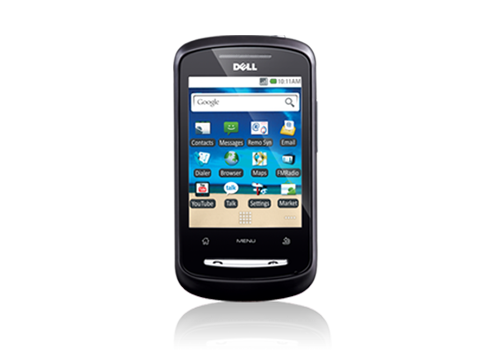
Dell XCD28
Create a new world every day
Visit Dell mobile reseller near you
New horizons. Colourful adventures. Exhilarating moments.
Inspiration sees no end in the world you create with the Dell™ XCD28. Bring your imagination to life with the smart 3G experience, Wi-Fi™, GPS and a host of exciting applications.
Inspiration sees no end in the world you create with the Dell™ XCD28. Bring your imagination to life with the smart 3G experience, Wi-Fi™, GPS and a host of exciting applications.
- Android™ 2.1 OS
- 3G HSDPA speeds upto 7.2 Mbps plus EDGE, GSM support
- Wi-Fi b/g connectivity plus Bluetooth® 2.1 EDR plus AGPS plus FM
- TFT LCD full touch up to 262K colours
- 3.2 MP camera with 5x zoom
- GPS will never leave you stranded. You can find the nearest city or simply find your way home with Google Maps
- Storage — 200MB internal user memory plus support for external SD card up to 8GB
- Access to Corporate Exchange Emails
- Document Reader (Word, PDF, Excel, Powerpoint)
- Includes 2GB Micro SD card
Minggu, 20 Maret 2011
Inspiron Mini 10 Netbook
The new designed InspironTM Mini 10 is a lightweight mobile netbook that goes anywhere with you, so it’s always easy to check your e-mail or connect to the Internet. It’s everything you need to stay in touch and entertained on the road.
- Get more done with up to 7 hours, 18 minutes of battery life
- Go anywhere effortlessly with a compact under 1.33kg design
- Store your movies, music and photos with the standard 250GB HDD
- Be productive with an easy-to-use 92% full size keyboard

Lightweight and Compact
The Inspiron Mini 10 goes anywhere you go — and with ease. With a slim profile for computing in compact spaces and a starting at weight of less than 1.33kg, you’ll want to bring the ultra-portable Inspiron Mini® 10 with you everywhere you go.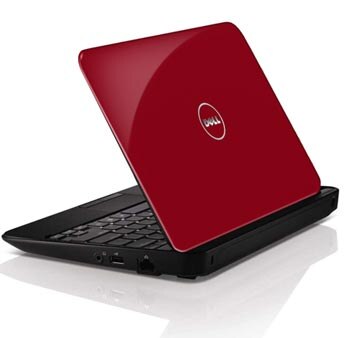
Uncompromising
The Inspiron Mini 10 is an affordable and lightweight netbook that doesn’t sacrifice any of the features you desire. In addition to long battery life, Genuine Windows® 7 and powerful Intel® processing, the new Inspiron Mini 10 boasts new options such as Wireless-N, DDR3 memory, a generous 250GB3 hard drive.
Entertainment on the Go
The Inspiron Mini 10 lets you watch movies, listen to music, edit videos and upload to the web to share your life with family and friends from almost anywhere.Powerful performer
With long-lasting battery life (up to 7 hours, 18 minutes), you’ll be able to do more of what you want and stay connected longer.
Beautiful view
The Inspiron Mini 10 boasts a seamless 25.7cm (10.1 inch) WLED display featuring a 16:9 aspect ratio that brings all your entertainment to life in stunning bright colors.

Maximum Connectivity
The Inspiron Mini 10 is built for today and tomorrow. Stay connected wherever you go with the new internal 802.11n WiFi connection, as well as Bluetooth® 3.0. Its lightweight design, including built-in webcam and microphone, will let you travel light while keeping up with your video chat, instant messenger and e-mail so you never lose touch with family and friends.
Smart Design
The Inspiron Mini 10 is the perfect travel companion that brings you sophisticated elegance in addition to processing power.Keyboard
The Inspiron Mini 10 features a keyboard 92% the size of a traditional laptop keyboard. And a touchpad design with discrete buttons means you don’t have to sacrifice comfort or productivity.
Hard drive
Store all your photos, music and videos and easily access them anytime you want with the standard 250GB hard drive.
Style
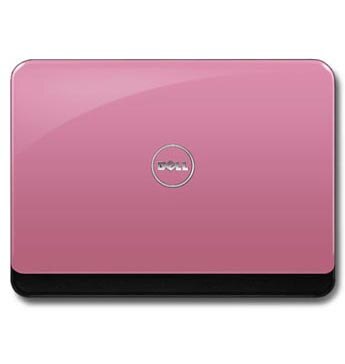
Premium design features sleek styling with soft curves, rounded edges and high-gloss black finish.
Fun Features
Take advantage of all the fun the Inspiron Mini 10 has to offer.- Support today’s bandwidth-hungry applications with Wireless-N, which lets you browse the Internet faster than Wireless-G, the networking standard most laptops are still using.
- Get the most out of your Inspiron Mini 10 with up to 7 hours, 18 minutes of battery life.
- Hold on to more of your content with the 250GB hard drive.
Kamis, 17 Maret 2011
Dell Venue Pro
Smart. Any Way You Slide It
- The stunning WVGA AMOLED capacitive, multi-touch display allows for easier navigation.
- With Office Mobile built in you can operate on the go as seamlessly as you would at the office.
- Take your gaming experience on the road with the phone that lets you play games on Xbox LIVE.

Ready for work and play
You want a smartphone that allows you to stay connected1, be productive and keep in touch with colleagues, friends and family? Venue Pro is a do everything smartphone that helps you be more efficient in how you stay connected and entertained. Seamlessly toggle between your work and life apps. From your favorite games to keeping up on Facebook® , Twitter™ , Gmail and YouTube™ , Venue Pro keeps what’s most important to you at your fingertips.

For your viewing pleasure
See the world and your life like never before with the stunning 10.4cm (4.1") WVGA AMOLED capacitive, multi-touch display. The large screen allows for easy navigation and viewing of your email, calendar and web. Your photos, videos and movies have never looked better in the palm of your hand. No more squinting or panning - see the full width of the web page in one glance. And the high-quality scratch-resistant Corning Gorilla® Glass means your view can stay crystal clear.
Your life at a glance with Windows Phone 7
Imagine being able to see everything you care about in a single glance without ever breaking stride — an email from a friend or co-worker, appointment reminders, the score in the game or just the weather and time. Customize the Live Tiles on your start screen so what’s most important to you is always front and center and easily recognized with a momentary look. Microsoft® Office Mobile built in lets you operate on the go as seamlessly as you would in the office.
Elegant beauty
While the Venue Pro, with its elliptical, slender form fits comfortably in your pocket, it’s probably the last place it will ever be. Sure, its large 10.4cm (4.1") display, that lets you see everything most important to you at a single glance, will make it hard to put down. But you’ll also love how it feels in your hand. And just a simple slide reveals the full portrait QWERTY keyboard, providing a superb viewing and messaging experience.
Selasa, 15 Maret 2011
Dell™ XPS 14 Laptop
1 Year XPS Premier service
Movies, games, music and web chat come to life with leading edge graphics, 3D capabilities, HD video chat and sound that can fill a room.
- Leading edge NVIDIA® performance graphics bring your media to life
- High-fidelity JBL speakers with Waves MaxxAudio®
- First Skype™ -certified laptop — video chat with HD webcam
- Enjoy 3D on the big screen with integrated NVIDIA 3DTV Play software

Feel the rush
Powerful graphics. Powerfully smart. The XPS™ 14 laptop has what it takes to take you to new levels of performance.Razor-sharp graphics come standard
Standard leading edge NVIDIA® performance graphics (available up to 2 GB) for powerful photo and video editing and high-resolution gaming with breathtaking detail.
Smart power management
Long media marathons are no problem with smart power management that helps extend battery life when you need it. NVIDIA Optimus™ technology automatically optimizes your battery life while maintaining the graphics performance you expect — completely seamlessly and transparently — whether you’re watching an HD movie, surfing the Web or playing a 3D game.


Mind-blowing audio
XPS laptops are designed to be the loudest, clearest and cleanest laptops on the planet with built-in high-fidelity JBL speakers and Waves MaxxAudio® technology. Together they produce rich, full sound that delivers booming bass and razor-sharp clarity to your favorite movies, music and games. Treat your ears to peak audio performance with the XPS 6W JBL speakers. Then, layer in the Waves algorithms, designed to deliver better dynamic range, frequency response and imaging, with maximum transparency, clarity and natural sound. Together, these technologies enable you to take the surround-sound experience of your home theater with you wherever you go.

Your Life in Hi-Def
XPS laptops have the tools that bring your world to you, wherever you are.Ultra-Clear. Ultra-Flexible. Connect with your loved ones across the globe in stunning high definition using the internet and XPS 14’s HD Webcam. It’s the first Webcam to offer HD video streaming for ultra-clear 720p resolution. The extreme flexibility of the new XPS also enables you to record video using different bit rates, depending on the application you use.
Connect to the World Video conferencing is now even easier with Dell and Skype™. The new XPS 14 is one of the first laptops to be certified by Skype and offers preinstalled Skype software standard on every XPS 14.

Movies, games and 3D videos come to life
XPS laptops are the first Dell laptops to offer integrated NVIDIA 3DTV Play technology. This enables you to leverage the 3D processing power of GeForce® graphics to create an immersive 3D experience in your own home, on the big screen. Simply connect your laptop to your 3D-enabled TV and effortlessly project your favorite Blu-ray 3D movies and 3D photo slideshows for a real-life theater experience. Then, bring your best games to life. Using the power of your laptop and your 3D TV, you can step into an eye-popping 3D gaming experience right in your living room. All you need to harness the 3D power of your XPS 14 is an HDMI cable, optional Blu-ray Disc™ drive, approved 3D-enabled TV and 3D media.Simple and Smart Support
Dell DataSafe Online Our online backup service offers data protection by enabling customers to back up data to a safe, remote storage site using a broadband connection. Dell DataSafe Online Backup is easy, flexible and secure. After setup, it will automatically back up data to help protect your data from software, hardware and catastrophic failure.
Dell Support Center Our centrally located, easy-to-use application provides personalized support resources. Conveniently located on your PC’s desktop with quick links to service, support and system resources. Helps keep your system up-to-date and running efficiently through automated fixes for common configuration issues.
Dell Support Center Our centrally located, easy-to-use application provides personalized support resources. Conveniently located on your PC’s desktop with quick links to service, support and system resources. Helps keep your system up-to-date and running efficiently through automated fixes for common configuration issues.

Sabtu, 12 Maret 2011
Killer Apps
The only reason that HP (or Samsung, Motorola, Nokia/Microsoft, and the others) has a chance in this market is that those incompatible mobile OSes nevertheless all run the two greatest killer apps of them all, aka web browsers and GPS navigation. Most of the other apps (mail, social networks, etc.) that users need are web or cloud-based and can be accessed via the browser if an alternative is not provided. In this sense, there is only one OS and it is the one supported by HTML and other established web formats. Apple may be at a slight disadvantage because it does not support Adobe's Flash standard.
What those companies may need to do is identify a handful of the top killer apps in the existing market and spend the right amount of money to make sure that those apps migrate to their own platforms. Providing powerful tools that can facilitate app migration should probably be at the top of their to-do list. After that, the market will become very much like the car industry, a matter of status, gadgetry, trend and fashion. Eventually, there will only be one basic OS, preferably a user-customizable OS
What those companies may need to do is identify a handful of the top killer apps in the existing market and spend the right amount of money to make sure that those apps migrate to their own platforms. Providing powerful tools that can facilitate app migration should probably be at the top of their to-do list. After that, the market will become very much like the car industry, a matter of status, gadgetry, trend and fashion. Eventually, there will only be one basic OS, preferably a user-customizable OS
HP's Risky Triple Play

Yesterday, HP announced its first three products using WebOS, the operating system for mobile devices that was its main prize for acquiring Palm in July of last year. HP is already known for printers, PCs, and laptops, but the new products—a tablet, an updated smart phone, and a new super-small smart phone—highlighted a new strategy for the company.
The Touchpad tablet, Pre 3 smart phone, and Veer mini smart phone, show WebOS in three different sizes. By announcing them together, HP hopes to emphasize both the flexibility of the operating system and how well WebOS can work for a user who owns multiple devices running it. It also hopes to spur developers to create apps for the platform. However, this may still not be enough to capture a market that's dominated by other big companies such as Apple and Google.
Palm's WebOS operating system was the ailing company's last-ditch effort to reclaim the market it once dominated with its popular PDA. The WebOS operating system uses Web technologies familiar to developers, such as HTML and JavaScript, instead of Objective C, the specialized language used to program apps for Apple's iPhone. The Palm Pre, which was the first device to feature the operating system, was praised for its design when released in June 2009, but it was a flop in the market, leading to HP's acquisition of Palm.
The acquisition of Palm, and the launch of these three devices, is an important move for HP, the world's largest personal-computer maker. The market is shifting away from desktop and laptop computers toward increasingly powerful smart phones and tablet computers. But the strategy HP has chosen is risky. It aims to innovate its way to a successful position in this emerging market, which is dominated by Apple with the iPhone and iPad, and by other hardware companies that use Google's free Android OS.
Now HP hopes to use WebOS to give it a leg up in the current war for mobile-device users. The Touchpad is a tablet designed to compete with Apple's iPad and its imitators. The Pre 3 is an updated entry into the smart-phone market. And the Veer is something of a novelty: a smart phone about the size of a credit card, although considerably thicker.
"For the first time, WebOS is on a device [the Touchpad] that lets its intuitive nature shine through," said Jon Rubinstein, a senior vice president and general manager at HP. Rubinstein is a former Apple executive who served as executive chairman of the board at Palm.
Augmented Reality Goggles

I held a black-and-white square of cardboard in my hand and watched as a dragon the size of a puppy appeared on top of it and roared at me. I watched a tiny Earth orbit around a real soda can, saw virtual balls fall through a digital gap in a table, and viewed a life-sized virtual human sitting in an empty chair.
What made these impressive special effects possible was a pair of augmented reality (AR) glasses—specifically, the Wrap 920AR glasses from Vuzix. Whereas virtual reality shows you only a digital landscape, augmented reality (AR) mixes virtual information, like text or images, into your view of the real world in real-time.
In the last few years, AR has started appearing on smart phones. In that context, software superimposes information on top of your view of the world as seen through the device's screen. But AR eyewear, which provides a more immersive experience, has been confined to academic research and niche applications like medical and military training. That's been largely because older AR hardware has been so bulky and has cost tens of thousands of dollars.
The Wrap 920AR from Vuzix, based in Rochester, New York, costs $1,995—about half the price of other AR goggles with similar image resolution. The company hopes that the glasses will appeal to gamers, animators, architects, and software developers, and it has developed software for building AR environments, which is included with the glasses.
Wearing the 920AR means looking at the world through a pair of LCD video displays. The 920AR is heavier than a regular pair of glasses but far lighter than other head-mounted virtual-reality displays I've tried. The displays are connected to two video cameras that sit outside of the glasses in front of the eyes. The screens show each eye a slightly different view of the world, mimicking natural human vision, which allows for depth perception. Accelerometers, gyro sensors, and magnetometers track the direction in which the wearer is looking. The glasses also come with ports that let users plug it into an iPhone for portable power and controls, such as loading a particular AR object or environment.
The Vuzix software can recognize and track visual markers (like the black-and-white piece of cardboard I held), or lock onto a certain object or color (like the soda can). Tracking works well as long as the pattern or object being tracked are visible to the cameras; tilting a tracking pattern too far will cause the virtual image to flicker. By tracking head movements, the software can make sure that virtual objects are perfectly positioned atop the real world.
Video
"There are other folks who make stereo, see-through eyewear, but there's no one making anything near the price point of Vuzix's," says Steve Feiner, professor of computer science at Columbia University, and a lead AR researcher since the 1990s. Feiner says that the integration of cameras and motion sensors into the display makes the glasses
Turning Augmented Reality into an Open Standard

A research team at Georgia Tech hopes to make augmented reality (AR) on smart phones more useful by developing an open standard for it.
Currently, there is no standard way to create or render AR applications, which overlay information on the live video feed from a phone's camera. Companies such as Layar help app developers create AR functions, but they use proprietary technologies. That means, among other things, that different AR apps may be unable to talk to each other or share data. The Georgia Tech team hopes that its open standard, an enhancement of existing Web protocols, will yield a common way for every Web browser to store, transmit, and manipulate data for augmented reality services. If it does, you wouldn't need a separate app for each AR function on your phone—one browser could show them all.
"We're the only people who are trying to piggyback intimately on top of Web architecture," says Blair Macintyre, director of the Augmented Environments Lab at Georgia Tech. The standard developed by his group is known as KML/HTML Augmented Reality Mobile Architecture, or KHARMA. It combines the Keyhole Markup Language (KML) used by the Google Earth mapping program with existing HTML and a handful of other protocols invented by Macintyre's team. The group also has built a reference browser—a sample of the technology in action—called Argon.
KHARMA is an evolution of the Web, rather than a wholesale invention of standards specifically designed for augmented reality. In contrast, almost all previous attempts to create a standard platform for augmented reality either in academia or commercially have been proprietary or purpose-built. This difference, argues Macintyre, could be the key to Argon and KHARMA's success. Argon is not yet open-source, but once it's stabilized, Macintyre's team will release the code base.
"My hope is that three years from now, all we've done is folded back into Webkit [the open-source engine that runs the Safari and Chrome browsers]," says Macintyre. "I joked at one of the meetings at one point that we know we've succeeded if the project is gone in three years."
Not everyone is sold on this vision. Avideh Zakhor, a professor of electrical engineering at the University of California, Berkeley, and a leading AR creator, believes it may be premature to work on standards when the technology itself is still in its infancy. "To me, the research problems are still wide open," she says.
Zakhor's work focuses on creating truly believable augmented reality experiences. She, together with her team, uses image-recognition algorithms to chase the ultimate goal: pixel-perfect imposition of objects, surfaces, images, and textures onto the reality viewed through a smart phone or headset. For now, AR apps don't recognize objects as much as they merely know where in the world they are, by relying on GPS and the location of cell-phone towers.
Argon is a browser built with expansion in mind, however. Its basic framework should be able to incorporate the kind of image-recognition algorithms that Zakhor is working on, Macintyre says.
One of the potential barriers to adoption of Argon—which has thwarted all augmented reality browsers to date—is the lack of a "killer app" for AR. But just as a Web browser is valuable mainly for its universality—it allows for e-commerce and e-mail and the consumption of media and a hundred other functions—a flexible AR browser could be greater than the sum of its parts.
"One of the goals of Argon is to find out what's the killer app for AR," says Hafez Rouzati, the lead developer of Argon and a doctoral student at Georgia Tech. "By releasing something like Argon, we're allowing people to show us. There's only so much we can imagine ourselves."
